Problems signing up?
When you click to sign up to The People's Hub, you will be taken to our Boost learning website.
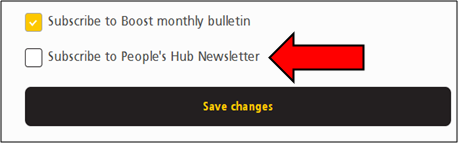
If you're new to Boost, you'll need to complete a short form so we can send you regular updates. Make sure you tick the box for the People's Hub newsletter.
You will need to create a password with at least:
-
8 characters
-
1 capital letter
-
1 number
-
1 lower case letter
-
1 special character
The form asks for your job and organisation – but don't let this put you off! There are options like 'retired' or 'member of the public'.
You will also be asked some questions about yourself. You don't have to answer if you don't want to, but if you do, this helps us make sure we are reaching people in all different parts of the community. We keep this information secure.
If you already have a Boost account, you will need to sign in.
To receive the People's Hub newsletter, click on 'account details' at bottom left (if you're on a computer).
If you're using a phone, click the three bars to open the menu. In your account settings there will be the option below. Just click the box marked 'Subscribe to People's Hub newsletter' and then 'save changes'.
If you're still having problems, please email us at nencicb.involve@nhs.net and we'll be happy to help.